Monday, March 23, 2026

 "𝐖𝐞 𝐰𝐞𝐫𝐞 𝐠𝐨𝐨𝐝 𝐚𝐭 𝐭𝐞𝐚𝐜𝐡𝐢𝐧𝐠 𝐩𝐞𝐨𝐩𝐥𝐞 𝐭𝐨 𝐩𝐫𝐞𝐭𝐞𝐧𝐝 𝐭𝐨 𝐥𝐢𝐬𝐭𝐞𝐧."


Years ago I was a facilitator for a highly structured commercial management training program, essentially a discussion planning system. The first "Key Principle" was "listen and respond with empathy." Participants scripted and rehearsed and delivered on the principle, usually pretty convincingly, before moving on to telling the practice employee they were in trouble, or being laid off, or would have to start working Saturdays...

I remember back then a certain L&D author writing, "We are very good at teaching people to pretend to listen," and thought at the time, "We are good at teaching people to pretend to be empathetic."

Can empathy be taught? To AI? There are lots of research reports looking at what aspects of human behavior/communication AI can successfully be trained on. Here are 2, one from Ziao et al. and the other from Kumar et al., that crossed my path this week. Ziao et al. explicitly discuss using LLMs to teach "empathy"; Xiao et al., which I see as related, focus on whether AI can move beyond tasks to deeper aspects of teamwork like collaboration and "fragile communication".

My interest is in how empathy is defined. Xiao et al.’s study participants view empathy as an inner social state that is difficult for machines to replicate. Kumar et al. define empathy for their study as a set of linguistic strategies (prescriptive behaviors like validating emotions).

What do you think?

Kumar, A., Poungpeth, N., Yang, D., Lambert, B., & Groh, M. (2026). Practicing with Language Models Cultivates Human Empathic Communication. arXiv preprint https://arxiv.org/pdf/2603.15245

Xiao, Q., Hu, X. E., Whiting, M. E., Karunakaran, A., Shen, H., & Cao, H. (2025). AI Hasn't Fixed Teamwork, But It Shifted Collaborative Culture: A Longitudinal Study in a Project-Based Software Development Organization (2023-2025). https://arxiv.org/pdf/2509.10956

Thursday, March 19, 2026

 𝐔𝐬𝐞 𝐀𝐈 𝐭𝐨 𝐒𝐡𝐨𝐰 𝐘𝐨𝐮𝐫 𝐖𝐨𝐫𝐤: 𝐏𝐫𝐚𝐜𝐭𝐢𝐜𝐞 𝐢𝐬 𝐍𝐨𝐭 𝐎𝐧𝐥𝐲 𝐎𝐮𝐭𝐜𝐨𝐦𝐞


Lots of ideas in my 𝘚𝘩𝘰𝘸 𝘠𝘰𝘶𝘳 𝘞𝘰𝘳𝘬 focused heavily on making thinking visible in simple, no-friction ways; these translate really well to using AI as a lightweight documentation and communication layer.

For instance:

1. 𝐒𝐡𝐚𝐫𝐞 𝐒𝐦𝐚𝐥𝐥, 𝐍𝐨𝐭 𝐏𝐞𝐫𝐟𝐞𝐜𝐭
Share small pieces of progress. Don’t wait until something is polished.
Showing your work might include:
quick reflections
partial solutions
emerging questions
early drafts

𝘏𝘰𝘸 𝘈𝘐 𝘊𝘢𝘯 𝘏𝘦𝘭𝘱:
AI can help you turn rough input into something shareable quickly.
Examples:
From messy notes, ask AI to draft a short team update.
Record a voice memo. Have AI convert it into a brief “what I’m working on” post.
Drop in a rough outline. Ask AI to organize it into a readable summary.
This reduces the barrier that perfectionism can create.

𝐍𝐚𝐫𝐫𝐚𝐭𝐞 𝐘𝐨𝐮𝐫 𝐓𝐡𝐢𝐧𝐤𝐢𝐧𝐠, 𝐍𝐨𝐭 𝐉𝐮𝐬𝐭 𝐘𝐨𝐮𝐫 𝐎𝐮𝐭𝐜𝐨𝐦𝐞𝐬
Learning often happens when people can see how decisions were made, not just what the final result was. An important part of successfully executing your role is understanding that 𝘱𝘳𝘢𝘤𝘵𝘪𝘤𝘦 𝘪𝘴 𝘯𝘰𝘵 𝘫𝘶𝘴𝘵 𝘰𝘶𝘵𝘱𝘶𝘵.

That includes:
tradeoffs considered
assumptions
uncertainty
what changed along the way
articulating decisions

𝘏𝘰𝘸 𝘈𝘐 𝘊𝘢𝘯 𝘏𝘦𝘭𝘱
AI can help structure narratives about decisions.
Examples:
“Turn this into a short reflection: situation, options, decision, lesson.”
“Summarize the reasoning behind this plan in plain language.”
AI becomes a thinking partner that can externalize judgment, helping you make your expertise more visible.

𝐋𝐨𝐰𝐞𝐫 𝐭𝐡𝐞 𝐄𝐟𝐟𝐨𝐫𝐭 𝐑𝐞𝐪𝐮𝐢𝐫𝐞𝐝 𝐭𝐨 𝐒𝐡𝐚𝐫𝐞
As I mentioned in an earlier post, a significant reason people don’t show their work is that documentation feels like extra work layered onto “real” work. (I remember one senior manager requiring so many “activity reports” that writing the reports themselves became a significant activity.) Look at ways of making sharing lightweight and habitual.

𝘏𝘰𝘸 𝘈𝘐 𝘊𝘢𝘯 𝘏𝘦𝘭𝘱
AI reduces the cognitive and time cost of sharing.
Examples:
Convert meeting transcripts into key takeaways.
Draft a quick lessons-learned post from bullet points.
Generate a short explanation of a process change.
Instead of writing from scratch, let AI help you refine. This supports the idea that showing your work should feel like a natural extension of doing the work, not a separate task.

See also Bozarth, J. 𝘚𝘩𝘰𝘸 𝘠𝘰𝘶𝘳 𝘞𝘰𝘳𝘬: 𝘛𝘩𝘦 𝘗𝘢𝘺𝘰𝘧𝘧𝘴 𝘢𝘯𝘥 𝘏𝘰𝘸-𝘛𝘰𝘴 𝘰𝘧 𝘞𝘰𝘳𝘬𝘪𝘯𝘨 𝘖𝘶𝘵 𝘓𝘰𝘶𝘥. Wiley/ATD.

Monday, March 16, 2026

AI Makes Showing Your Work Easier


"Silos" image from Bozarth, J. Show Your Work. Wiley/ATD.

It won’t do the thinking for you, and it won’t replace the work itself. What it can do is act as a kind of documentation and communication layer on top of what you’re already doing. Used thoughtfully, AI can lower the friction involved in making work visible.

Here are a few practical ways to get started:

Build a Reflection Habit; Turn rough notes into useful updates

Most of us already have fragments of documentation, like bullet points from meetings, scribbles in a notebook, and half-finished planning notes. The problem is not always lack of information, but the effort required to turn that information into something shareable.

Try to build a reflection habit. Before moving on from a task, or heading to lunch, or wrapping up at the end of the day, pause for a moment and capture a few thoughts: What was harder than expected? What was easier? What did you do particularly well? What would you try differently next time? What related idea is worth revisiting?

AI can help transform those bits and pieces into short summaries for your team or Community of Practice. Framing this as refining something that already exists rather than starting from a blank page can make working out loud feel more manageable. Over time it will help you build a history of personal growth and organizational learning.

Capture decisions while they’re still fresh

After finalizing an idea it’s easy to move on to the next task without reflecting on what just happened. Unfortunately, that’s also when valuable insight gets lost. Try briefly describing the situation, the options considered, and the reasoning behind the decision. Send yourself an email or add the note to a working file, and ask AI to structure that into a short reflection. Over time, these small records can become a rich source of learning, for both yourself and others.

Make thinking visible without over-polishing

Working out loud does not require perfectly crafted prose. In fact, over-polishing can slow the process so much that people stop doing it altogether. If you have a draft email, project plan, or rough analysis, AI can help you generate a concise explanation of your approach that you can share with colleagues. The goal is clarity, not perfection. Visibility, not performance.

Help ideas travel

Another common challenge in organizations is translation. Technical experts explain things in ways that make perfect sense to other specialists — and far less sense to everyone else. AI can help rewrite explanations for different audiences. A dense technical description can become a clear overview for senior leaders. A high-level strategy statement can be translated into more concrete guidance for front-line teams. When ideas are easier to understand, they move more easily across boundaries. And that will accelerate learning.

Reducing the Cost of Working Out Loud

Working out loud has always offered clear benefits: stronger connections, faster problem-solving, more reuse of knowledge, and better awareness of what is actually happening in the organization. The difficulty has been sustaining the habit when time feels scarce.

AI does not eliminate the need to reflect, document, or share. What it can do is reduce the effort required to turn everyday experience into something useful. With a few intentional prompts and small adjustments to workflow, showing your work can become less of a chore and more of a natural extension of doing the work itself. It can make your own thinking and work more visible -- even to you.

For more see Bozarth, J. Show Your Work: The Payoffs and How-Tos of Working Out Loud, Wiley/ATD.

Monday, March 02, 2026

 𝐂𝐚𝐩𝐭𝐮𝐫𝐢𝐧𝐠 𝐞𝐱𝐩𝐥𝐢𝐜𝐢𝐭, 𝐛𝐮𝐭 𝐧𝐨𝐭 𝐭𝐚𝐜𝐢𝐭, 𝐤𝐧𝐨𝐰𝐥𝐞𝐝𝐠𝐞,
𝐚𝐧𝐝 𝐭𝐡𝐞 p𝐫𝐨𝐛𝐥𝐞𝐦 𝐨𝐟 𝐁𝐚𝐫𝐞𝐥𝐲 𝐑𝐞𝐩𝐞𝐚𝐭𝐚𝐛𝐥𝐞 𝐏𝐫𝐨𝐜𝐞𝐬𝐬𝐞𝐬

(from my "Show Your Work: The Payoffs and How-To's of Working Out Loud", Wiley/ATD)

Many organizations are good at capturing the basics of explicit information: to order product 𝘡, fill out form 𝘕; submit requests by Thursday. But much of our time is spent dealing with Barely Repeatable Processes: the ones that involve people, and which are often managed through a morass of emails, lunches out, post-it notes, and meetings. It is, in other words, how most of us spend most of our days. They are fluid (non-rigid) processes and events with many moving parts that are not easily mapped, as with a manufacturing process.

The truth is, asking someone to ‘write down everything they know’ or ‘list everything they do’ just doesn’t work very well. We can find out what they do, but not 𝘩𝘰𝘸 𝘵𝘩𝘦𝘺 𝘨𝘦𝘵 𝘵𝘩𝘪𝘯𝘨𝘴 𝘥𝘰𝘯𝘦. And overengineered, bureaucratized reports and documentation processes are often exercises in futility as they capture the “what” of work but not the “how”.

The image below shows an example of a newly-implemented process for submitting status reports. It was provided by an HR outsourcing firm's middle manager who asked to remain anonymous. The IT department developed it to force employees to use SharePoint instead of the less formal tools they had been using. When I asked for details, as the image is not very legible, the person who submitted it said: “You don’t want to be able to read it. You’ll go blind.”


Wednesday, December 02, 2020

The OEB Plenary Debate 2020: Is Academic Learning Only for Eggheads?

Today I will be participating in Online Educa Berlin (OEB) 2020 as a participant in the annual plenary debate. I am sad that COVID is keeping us from gathering in person in Berlin this year and especially miss hugging dear colleagues and seeing the delights of the Christmas markets.  The debate motion changed significantly after I agreed to participate; as submitted to the conference organizers it was: "University should be for the elite! Could it be argued that by far the majority of people who go to university do so for these three reasons; for status, to get a job, and to have some fun.  While it could also be argued that it is not the responsibility of the state to subsidise those who wish to improve their status and have fun perhaps it is their responsibility to help its citizens become productive and self-sufficient.  But do we really need universities to do that.  We, in online learning, know that it can be done in other more cost effective ways?  It could be argued that people learn more efficiently at work. Combining work with study and training both online and on the job may well be a better way to make them productive and self-sufficient.  So why do we need higher education?  The argument that it develops the “whole person” or enhances critical thinking is somewhat doubtful and this too can be achieved in other ways."

This changed significantly in the weeks leading up to the event, finally landing on the idea that universities are "unsustainable". While I found that a quantum shift from the original idea, I did rework my comments to fit the revisions: In my role in the debate I oppose the motion and challenge several assumptions posited within the published debate topic: "Universities, in their current form, are unsustainable as mass participant institutions: In the higher and vocational sectors, some experts want to make learning more needs-based, shifting the balance towards skills that are directly applicable to the workplace, leaving pure academic learning and research to a small number of brilliant minds. But is this the right approach?"


Here are my comments: 

I oppose the motion and challenge several assumptions posited within the published debate topic.

First, that the in-person experience needs to be replaced with all-online instruction.  That is happening now, in many places in 2020 due to COVID-related circumstances, and people are finding it less than satisfactory for a number of reasons. I am a proponent of online learning; I have an advanced degree in it and for 15 years my primary work role was evaluating and advocating for the use of educational technologies and alternative approaches to traditional instruction. My introduction to and subsequent support for online learning came from my own graduate-level courses. I submit that in addition to the quality of coursework regardless of delivery mechanism there is value, particularly for young people, to what we here call the “university experience” enhanced by interacting and living, at least for part of the time, in the residential university setting, with other humans in a physical space sharing the pursuit of new learning.  After all, we are gathered at an event targeted at online education practitioners and enthusiasts, and while this virtual format allows for additional participants, many of us still wish we could be together in-person.  

The assumption that the only point of university education is as the means to better employment options, and should therefore be replaced with vocational training, brings with it a disregard for its less-tangible benefits. Mr. Mulligan and I have sparred over the years about whether the university experience produces a person with nebulous traits such as being more well rounded, and often conversations are anecdotal and offered just from our own experiences. In fact research has shown ways of measuring some non-monetary benefits of higher academic education. For instance, those with higher education levels tend to be healthier, as do their children, and they tend to live longer and see lower infant mortality. They are more likely to have longer marriages. They enjoy more leisure pursuits and hobbies. They exhibit more social cohesion: They are less prejudiced and are more likely to donate money and time. They tend to make more deliberate choices when voting  and participate in more community organizations. In a bit of irony, research shows that higher education levels correlate with technology adoption.  The lesser known aspects of those outcomes are how much and in what ways the in-person university experience, including time spent outside of coursework proper, influences them. And while vocational training may indeed prepare a person to enact a particular work role, those with university educations experience more employment flexibility. 

I push back against the idea that university education should be reserved for some elite group of knowledge-makers and thinkers. It is not lost on me that the debate participants today are all privileged, educated, middle aged white people discussing whether others should be denied access to the same experiences we had. To deny anyone with the desire to learn the chance to experience coursework in the humanities --art, literature, history, political science, music, and the like – denies them a rich way of experiencing the world.  I noticed in the marketing blurbs we each submitted for this event that Donald chose to quote Roger Schank, so I thought I would as well. In a recent tweet Schank said, “OMG, what will happen if students don’t learn art history?”  While the world will no doubt keep turning I think it is a better place with art in it, and people who understand and can interpret art across the ages, even if they do not plan to become museum curators --which I feel the world also needs. And people with that understanding might bring their knowledge to bear on any number of professions, including our own, so replete with designers as it is. To a  more pragmatic point, the real world of work does, for now, often demand possession of a degree, and denying access to that will only further limit opportunities, particularly for women and minorities. The sometimes-noted view that anyone wanting such other knowledge can just ‘learn it on their own’ is dismissive and unrealistic. We are not all created equal self-directed learners. I am certainly motivated and interested in  learning -- and I engaged in nearly 10 years of part-time graduate work with no promise of any increase in income – because I felt I needed structure and guidance for it.

Finally, to borrow a phrase from the published debate description, we need to take a careful look before we throw the baby out with the bathwater. Just completing a list of online vocational courses is not the same as experiencing a broad, robust shared experience. Reserving non-vocational learning experiences only for the eggheaded few diminishes opportunities for them and a richer world for us. I feel that far from limiting those opportunities, we need to look at expanding them. A favorite blogger of mine is software developer Joel Spolsky who a few years back wrote a post that has stuck with me, about the problems caused when software companies decide to rewrite code from scratch. Netscape  and Quattro Pro tried it with disastrous results. Spolksy’s point is that it’s harder to read code than it is to write it. Different features exist, or don’t, for a reason. Different people like different features. Bugs have been found and fixed. While I don’t disagree that the current state of university education has problems, I share a key point from Spolsky: “ It’s important to remember that when you start from scratch there is absolutely no reason to believe that you are going to do a better job than you did the first time”, which we are seeing now in education’s response to the events of 2020. I suggest we give long, hard thought to what it is we want to improve, and for whom, before declaring the existing education system unsustainable. I am all in favor of increased vocational training and alternatives, and also of finding  ways to expand opportunities for those wishing to reap the benefits of the university experience, rather than throw away the improvements to the lives of individuals and society that those benefits can afford.  

For a view from the other side of the debate please see Brian Mulligan's contribution


Tuesday, October 20, 2020

Snagit: What's In My Tray?

 I’m a longtime Snagit lover, back to my early days designing eLearning in state government with no budget. I'd tried to get by with MS Paint but had pushed past its limits. Somewhere around 2003 Snagit appeared on my radar because of its reasonable price and quickly became my go-to for many applications. It’s literally my most-used tool for years now, both for work and personal use.  Most of my books were built largely with Snagit screenshots, and I’ve mentioned Snagit in many presentations and publications. So I was delighted when TechSmith contacted me, called me a POWER USER* -- which made me feel as if I had superpowers and should be wearing a cape -- and asked if I might like to talk about some ways I use Snagit. I was delighted to be asked.

Here is my Snagit screen showing recent captures in the tray at bottom. The numbers correspond to some detail about each, below:

Screenshot showing snagit tray with 9 numbered items

 1. A tweet I used in a recent keynote presentation. I found an interesting continuum of behaviors associated with online friendships, dated 2009, and before using it in my presentation wanted to see if others felt it was as accurate/current as I. (Answer: Yes, they did, so I used the image, tweet and all.)

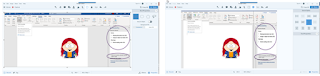
2. Prompts for opening and continuously running Word’s accessibility checker. A friend new to accessibility had asked for help getting started. Note that the original image contained a wide gray area between the document and the prompts at right, making the image bigger than it needed to be and making the user’s eyes jump from document to prompts and back. I cropped the edges, then  used Snagit’s “cut out” tool to remove most of the gray area the entire length of the screenshot: 

Side by side images showing reduction in size after using cut out tool

3. Screenshot of an invoice for a product purchased in another country, in foreign currency, for which I would be getting reimbursed. I noticed the promised confirmation email had not arrived so thought I’d better grab this before leaving the website. I pasted it into an email to the person providing reimbursement.

4. Image for a blog post on designing instruction for novice v. expert learners. A Facebook friend posted a photo of her young nephew playing with LEGO with the caption, “Love that we’re now at the point where we can improvise beyond the instructions.” It was a great illustration for my topic but the child’s mother did not want me to share the photo. So I used Snagit to grab a picture of another child from a clip art gallery and pasted it in.

5. Image of Plaut’s Elements of Learning Experience Design to use as a discussion starter in a client meeting.

6. Side-by-side images of a cartoon badger and my dog. I don’t remember why but it seemed important at the time. Note: I went back and used the “blur” tool to obscure the cartoon image for use in this post, as I do not care to invite the attention of the many lawyers employed by the company that created the cartoon badger. Just take my word for it that my dog and the badger share a remarkable likeness.

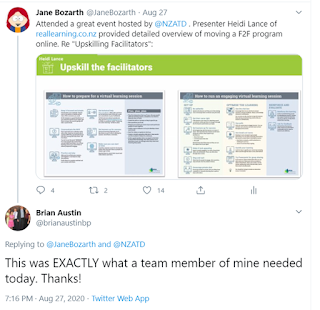
7. Slide shared in a webinar hosted by NZATD. The presenter had developed quick aids for people suddenly put in the position of moving traditional training to the virtual classroom environment. I asked if I could share it, then grabbed this screenshot and tweeted it out, to this response:

Tweet with image of facilitation skills job aid

8. From the same NZATD webinar. Although I was up at 3 am to attend it, I was having a fabulous hair day and wanted that on record.

9. Photo from a Zoom-based baby shower for a colleague. I used the shape tool to block my own face from the lower right of the shot. 

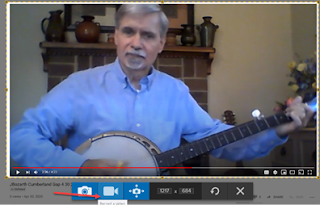
While there’s not an example in my tray, I frequently use Snagit for video editing. Example: After the COVID stay-at-home orders began I figured it would be a good time to pick up my banjo again and was delighted to find that the instructor who taught me when I was a teenager is still in business in my hometown. Now every Thursday morning he sends me a new lesson via YouTube. I’ve been playing a long time, even though I often lapse, so after a few run-throughs I rarely need to reference the whole video again. But I do sometimes will want to revisit an important or tricky piece, so I use Snagit to clip out that bit and save it as a separate file. This is 9 seconds of a 4-minute video edited with the Snagit video editor (video used with his permission). Also note use of the Snagit arrow tool at bottom of this screenshot:

Man playing banjo
Snagit Video Editor interface 

Quick clip from long video  

Not that you asked, but here I am playing the same bit from the
same song a couple days later.

Note that you can also make GIFs with the Snagit Video Editor. (You're welcome.) 

Snagit has been a critical part of my workflow pretty much for as long as I can remember working in eLearning. I use it all day, every day, whenever I’m on my computer. I hope my examples offer you some inspiration or perhaps highlight a Snagit feature you haven’t yet explored. 

*Many power users of products are people like me who are working with limited resources. This 2018 Learning Guild research report, eLearning on a Shoestring, features successful practitioners enacting great work on tight budgets. All ascribe their success, at least in part, to a willingness to explore and practice with a tool, looking for ways it can solve problems.  


Thursday, October 15, 2020

Psychological Safety: Critical for Learning?

Due to the COVID-19 pandemic, 2020 has been a year of uncertainty for many professionals. People were suddenly shifted to working from home and many in-person activities within the training and education field were hastily adapted into virtual ones. Other organizations were asking employees to continue working in what was now a risky physical environment. All of these unexpected changes raised concerns and fears related to psychological safety.

In the October 2020 The Learning Guild Psychological Safety: Critical for Learning?, I define psychological safety and examine its impact on both individual learners and groups. Key areas covered include simulations, facilitator skills, feedback, collaborative work, and employee engagement. See how building and fostering a psychologically safe work environment can help encourage and motivate learners at all levels.

The report is free with a free membership to The Learning Guild


Thursday, September 10, 2020

What Works - and What Doesn't - In Diversity Training

 Organizations implement diversity initiatives for a number of reasons, including a desire to increase representation, decrease workplace conflicts, and teach different individuals how to work together effectively.

This new research report from The Learning Guild, What Works, and What Doesn’t, in Diversity Trainingassesses literature on diversity training, outlining key points and offers insight into which strategies lead to either the success or failure. You will get a glimpse into the benefits of developing a successful diversity training program within your organization, which approaches you should consider when planning your efforts, and which tactics you should avoid.

The report is available for free with a free membership to The Learning Guild


Thursday, August 06, 2020

Evidence-Based Design for Virtual Classroom Experiences

In watching events of 2020 unfold I've seen many organizations make a sudden shift from face-to-face training to the virtual classroom. There's lots of talk about the technology -- security concerns, the unending challenges of the mute button, even how to create Zoom backgrounds -- but I see much less about ways of making the actual instruction better. 

In the August research report from The Learning Guild I offer some suggestions for this based on some sound principles for design as well as suggestions for helping facilitators sharpen their skills, or develop new ones, for the new environment.  Evidence-Based Design for Virtual Classroom Experiences  is available for free download with a free membership to The Learning Guild. 


Thursday, May 14, 2020

Less Content, More Learner: An Overview of Learning Experience Design (LxD)

This month's research report from The Learning Guild is Less Content, More Learner: An Overview of Learning Experience Design (LxD)Where traditional approaches to workplace learning tend to focus on building knowledge and/or skills, learning experience design is concerned with additional areas, such as shoring up learner confidence and increasing motivation to learn. This new report provides an overview of this exciting approach to workplace learning and suggestions for mapping learner experiences and journeys. 

This report is available for free with a free membership to The Learning Guild. 


Saturday, April 18, 2020

Designing for Behavior Change: A Conversation with Julie Dirksen

In this video research report, Julie Dirksen provides an in-depth look at Susan Michie et al.’s research on how to understand and support behavior change to improve job performance. Dirksen shares common problems that arise when designing learning experiences for changing behaviors and explores how you can use the Susan Michie et al.’s COM-B model to find solutions.  The report can be accessed via a free membership to The Learning Guild.