A participant in the current session of my "Online Trainer" course sent this my way and thought I should share it with the world. I think I had this guy in the 8th grade, and he was still wearing that suit...
Friday, October 24, 2008


Friday, October 10, 2008
"27 Top Women Edubloggers"
So I have been saying for years that "women in technology" were getting short shrift. Thanks to Zaid for posting a list of top women edubloggers (as in, women who blog about education, not women who use Edublog). I am in very good company on a list that includes my hero Jane Hart.
Sunday, September 21, 2008
Finally! Free robust tool for collaboration
Check out Wiggio, now in Beta. Shared calendar, real-time polling, mass text/chat,central-folder doc storage, conference calling... all in one, all for free.
Saturday, September 06, 2008
The Reluctant Adult Learner
"Every time I learn something new, it pushes some old stuff out of my brain."
Credit to Mo Costandi, who posted this clip on his Neurophilosopy blog.
Credit to Mo Costandi, who posted this clip on his Neurophilosopy blog.
Thursday, September 04, 2008
101 Free Learning Tools
From Zaidlearn: Great stuff from web hosting and LMSs (do you really need an LMS? Really? Oh don't get me started.) to hosted virtual classrooms, screencasting, mindmapping, quiz engines...oh I could go on...
Tuesday, September 02, 2008
Lifelong Learning
Long story, but today while researching positive deviants for an upcoming workshop I ran across an article in a back issue of Psychology Today:
"Our current education system was created in the late 1800s and early 1900s, and was modeled after the new factories of the industrial revolution. Public schools, set up to supply the factories with a skilled labor force, crammed education into a relatively small number of years. We have tried to pack more and more in while extending schooling up to age 24 or 25, for some segments of the population. In general, such an approach still reflects factory thinking--get your education now and get it efficiently, in classrooms in lockstep fashion. Unfortunately, most people learn in those classrooms to hate education for the rest of their lives.
The factory system doesn't work in the modern world, because two years after graduation, whatever you learned is out of date. We need education spread over a lifetime, not jammed into the early years--except for such basics as reading, writing, and perhaps citizenship. Past puberty, education needs to be combined in interesting and creative ways with work. " (Emphasis mine--jb)
Reactions?
From Estroff, M. Trashing Teens. By: Marano, Hara Estroff, Psychology Today, Mar/Apr2007,40 (2).
"Our current education system was created in the late 1800s and early 1900s, and was modeled after the new factories of the industrial revolution. Public schools, set up to supply the factories with a skilled labor force, crammed education into a relatively small number of years. We have tried to pack more and more in while extending schooling up to age 24 or 25, for some segments of the population. In general, such an approach still reflects factory thinking--get your education now and get it efficiently, in classrooms in lockstep fashion. Unfortunately, most people learn in those classrooms to hate education for the rest of their lives.
The factory system doesn't work in the modern world, because two years after graduation, whatever you learned is out of date. We need education spread over a lifetime, not jammed into the early years--except for such basics as reading, writing, and perhaps citizenship. Past puberty, education needs to be combined in interesting and creative ways with work. " (Emphasis mine--jb)
Reactions?
From Estroff, M. Trashing Teens. By: Marano, Hara Estroff, Psychology Today, Mar/Apr2007,40 (2).
Friday, August 29, 2008
Learning is not the opposite of teaching.
That's it. The whole post. Can't remember who said it and Google doesn't say, so my apologies to the originator:
"Learning is not the opposite of teaching."
"Learning is not the opposite of teaching."
Thursday, August 21, 2008
Kevin Brown, with the Office of the Worker Adviser, Central Client Services Unit, sat in on my "E-Learning on a Shoestring" session at last week's E-Learning Guild forum. We fell into conversation about our mutual interests in ergonomics (his) and accessibility (mine), which led to questions about keyboard shortcuts for those using PowerPoint-based elearning. As he puts it, "Providing multiple
methods of input is not only necessary to accommodate people who are
injured or disabled, but it is a great way to help prevent injuries." Converting your PPT-based programs to Flash should (depending on your converter) solve the problem and provide keyboard accessibility.
For those delivering the PPT files intact, Kevin also offered these tips:
"There are keyboard shortcuts to access hyperlinks that continue to
work in kiosk mode. The help file describes them as follows:
- Go to the first or next hyperlink on a slide --> TAB
- Go to the last or previous hyperlink on a slide --> SHIFT+TAB
- Perform the "mouse click" behavior of the selected hyperlink -->
ENTER while a hyperlink is selected
- Perform the "mouse over" behavior of the selected hyperlink -->
SHIFT+ENTER while a hyperlink is selected
Using the TAB, ENTER and SHIFT keys, users can cycle through the
available hyperlinks on a slide and "click" on their choice. I don't
know how well this would work with something complex with a lot of
links, but for most purposes it seems like a pretty good workaround.
I think I would still prefer the ability to assign keys to specific
buttons (e.g., right arrow for next or "M" for menu)-- mostly because
that would allow me to label each button with a keyboard shortcut.
But, as you rightly point out, sometimes a pretty good solution based
on what you have available and know how to use is better that a
perfect one based on something you don't." --Kevin Brown
methods of input is not only necessary to accommodate people who are
injured or disabled, but it is a great way to help prevent injuries." Converting your PPT-based programs to Flash should (depending on your converter) solve the problem and provide keyboard accessibility.
For those delivering the PPT files intact, Kevin also offered these tips:
"There are keyboard shortcuts to access hyperlinks that continue to
work in kiosk mode. The help file describes them as follows:
- Go to the first or next hyperlink on a slide --> TAB
- Go to the last or previous hyperlink on a slide --> SHIFT+TAB
- Perform the "mouse click" behavior of the selected hyperlink -->
ENTER while a hyperlink is selected
- Perform the "mouse over" behavior of the selected hyperlink -->
SHIFT+ENTER while a hyperlink is selected
Using the TAB, ENTER and SHIFT keys, users can cycle through the
available hyperlinks on a slide and "click" on their choice. I don't
know how well this would work with something complex with a lot of
links, but for most purposes it seems like a pretty good workaround.
I think I would still prefer the ability to assign keys to specific
buttons (e.g., right arrow for next or "M" for menu)-- mostly because
that would allow me to label each button with a keyboard shortcut.
But, as you rightly point out, sometimes a pretty good solution based
on what you have available and know how to use is better that a
perfect one based on something you don't." --Kevin Brown
Sunday, August 10, 2008
Denver

Am here for the Leadership Challenge forum (to reseach the new training package I'm writing as part of the LC series)and went out for a walk this morning awaiting the opening of the Bump & Grind Cafe (destination spot for any delicate flower of Southern womanhood). I'm staying near the Capitol so there are lots of historic spots nearby, highlighted by these great posters. You can walk along, call in, get a "story". I am thinking there are great implications here for training but am interested in hearing your thoughts?
Also, if you're ever in Denver, check out the Chicken Lips Theatre improv group. Great fun, especially for fans of Whose Line is it Anyway?
Friday, August 01, 2008
Way more than one born every minute
This just in from a training colleague with a municipal government in a Midwestern state, and no I am not making this up, because, well, I don't have to:
"Jane,
I thought the City was going to buy the PresentationPro PowerConverter ($199) , but now I understand they'd rather buy something that costs $7800. of course, I have no idea what the $7800 software does; I can't find their web site!
I thought this would be a good entry for your blog! Still crazy, huh! I had referred our IT people to your website for free and lowcost LMS info, but...there's this stuff the police department bought - $7800 for 80 users!
i'm thinking I'll just buy the software myself, install it at home, get my ppt. converted to flash, and post it."
Yet another high performer forced to go out of pocket to achieve the most basic of results...while spending precious energy to circumvent the paradigm, the bureaucratic class, and the Vermicious Knids determined to prevent anything that might resemble a real outcome.
I am so amused by this that I am not going to moderate comments about it. Y'all go to town.
"Jane,
I thought the City was going to buy the PresentationPro PowerConverter ($199) , but now I understand they'd rather buy something that costs $7800. of course, I have no idea what the $7800 software does; I can't find their web site!
I thought this would be a good entry for your blog! Still crazy, huh! I had referred our IT people to your website for free and lowcost LMS info, but...there's this stuff the police department bought - $7800 for 80 users!
i'm thinking I'll just buy the software myself, install it at home, get my ppt. converted to flash, and post it."
Yet another high performer forced to go out of pocket to achieve the most basic of results...while spending precious energy to circumvent the paradigm, the bureaucratic class, and the Vermicious Knids determined to prevent anything that might resemble a real outcome.
I am so amused by this that I am not going to moderate comments about it. Y'all go to town.
Sunday, July 13, 2008
PowerPoint to Flash converter
...so while I am a long-term user and big fan of PresentationPro's PowerConverter product, in the interest of democracy and all things fair I feel I should share the good feedback I've been getting on Wondershare . Remember that any ppt-to-flash converter tool will have its pluses and minuses, and choose the product that fit your needs. (Hint: knowing what your needs are before you buy any product will help the purchase be more successful. I know it sounds obvious, but I hear near-daily horror stories about an organization purchasing a product, then subsequently forcing every need to fit it.)
Monday, June 09, 2008
...And the Learners Start to Drive...
With many innovations, the end users ultimately take the wheel. One of my pet interests is classroom trainer fears of e-learning, and I've been saying forever, or at least since 2001 (which is almost forever in e-learning years), that eventually the learners would start to drive. This week's Time magazine has a piece on "Daddy Boot Camp" for new fathers that includes this:
"...enrollment in childbirth classes has fallen from 70% of first-timers in 2002 to 56% in 2006--with the drop-off due in part to expectant couples' assuming they can learn just as much from books or online."
Several things here: Learners are recognizing that they can be self-directed and self-taught. The learner assumption that this can be learned via books or online won't change--we're there. So we'd better be sure the e-learning is good.
"...enrollment in childbirth classes has fallen from 70% of first-timers in 2002 to 56% in 2006--with the drop-off due in part to expectant couples' assuming they can learn just as much from books or online."
Several things here: Learners are recognizing that they can be self-directed and self-taught. The learner assumption that this can be learned via books or online won't change--we're there. So we'd better be sure the e-learning is good.
Monday, June 02, 2008
When to Use Video
Karl Kapp, Susan Boyd and I are in Philadelphia this week providing the ID Institute for the Society for Technical Communication Summit. I'm in the back of the room now while Karl's presenting his session on choosing instructional strategies. He just said something great about when and how to use video, and I think it's worth sharing:
"If the only thing moving is somebody's lips, then you don't need video."
"If the only thing moving is somebody's lips, then you don't need video."
Saturday, April 26, 2008
"Heat"
Greetings from Sint Maarten, where I've spent the past couple of days in the sun reading (appropriately, as this is the island of high temps and fine dining) Bill Buford's Heat. Like Atul Gawande's wonderful Complications, Heat is an interesting first-person account of how an adult learns. Those interested in adult learning, reflective practice, self-directed learning, the transfer of tacit knowledge, or communities of practice will likely find this a worthwhile read.
Tuesday, April 01, 2008
New ID book ships next week!

My new big red (very red) book ships next week, chock-full of tools, templates, checklists, worksheets, guidelines, tips, rants (well, only on problems with evaluation and "ROI"), most of them also available as printable/editable items on the CD.
The long list of contributors reads like a who's-who in contemporary training, including folks like Karl Kapp, Jennifer Hofmann, Jean Barbazette, Don Clark, Patti Shank, and Ruth Clark, and includes some lesser-known trainers with good stuff to share. Check out the searchable version on Amazon: From Analysis to Evaluation: Tools, Tips, and Techniques for Trainers .
Thursday, March 27, 2008
Musings about level 1 evaluation....
While I'm not much of a fan of Level I evaluation, I do think it can shed insight into the effectiveness of our programs if we ask the right questions and pay attention to the answers. I'm dealing with metrics-fans right now who want to ask smile-sheet questions like, "On a scale of 1 to 6, did you find the training useful? ..." What am I supposed to do with knowing that people ranked the training as an average of 5.9 in 'usefulness'? Or worse, a 2.6?
Here's an evaluation Kassy LaBorie and I did yesterday in the wrap up to our online "Games Synchronous Trainers Play" session. (See citation at the bottom of this post). It tells us much more than the typical "smile sheet"

What can I tell from this? That we emphasized the right things; that our points were clear; that we met our objectives; that we have provided people with tools (games) they feel they can integrate into their own synchronous programs. Next go round we may emphasize even more the need to incorporate games as they relate to content, not just as filler, I also see that we may have given the wrong impression about something: there's a comment in the lower right quadrant about self-paced learning, which we didn't discuss at all and certainly weren't casting aspersions toward. (Heck, I'd rather access the worst self-paced program than most lecture-based 'webinars' any day!)
And what else does it tell us? Well, for those who believe that the online experience suffers due to lack of eye contact and body language, look at this screen again: are people interested and engaged? Do I really need traditional "eye contact" to tell me that?
If you must undertake Level I evaluation, try to find something that will give you more meaningful information than "4.5" ratings with no explanation. And pay attention to the feedback!
What other ideas do you have for evaluating at this level?
Evaluation activity submtted by Michele St. Pierre; adapted from an activity in Pike & Solem's 50 Creative Training Closers (Pfeiffer, 1998).
Here's an evaluation Kassy LaBorie and I did yesterday in the wrap up to our online "Games Synchronous Trainers Play" session. (See citation at the bottom of this post). It tells us much more than the typical "smile sheet"

What can I tell from this? That we emphasized the right things; that our points were clear; that we met our objectives; that we have provided people with tools (games) they feel they can integrate into their own synchronous programs. Next go round we may emphasize even more the need to incorporate games as they relate to content, not just as filler, I also see that we may have given the wrong impression about something: there's a comment in the lower right quadrant about self-paced learning, which we didn't discuss at all and certainly weren't casting aspersions toward. (Heck, I'd rather access the worst self-paced program than most lecture-based 'webinars' any day!)
And what else does it tell us? Well, for those who believe that the online experience suffers due to lack of eye contact and body language, look at this screen again: are people interested and engaged? Do I really need traditional "eye contact" to tell me that?
If you must undertake Level I evaluation, try to find something that will give you more meaningful information than "4.5" ratings with no explanation. And pay attention to the feedback!
What other ideas do you have for evaluating at this level?
Evaluation activity submtted by Michele St. Pierre; adapted from an activity in Pike & Solem's 50 Creative Training Closers (Pfeiffer, 1998).
Tuesday, March 18, 2008
PowerPoint lesson of the day...
Yesterday I watched someone wrestle to remove a background from a photo, using expensive software with a long learning curve, with lots of time consumed and much frustration. It took me exactly 4 seconds using...PowerPoint.
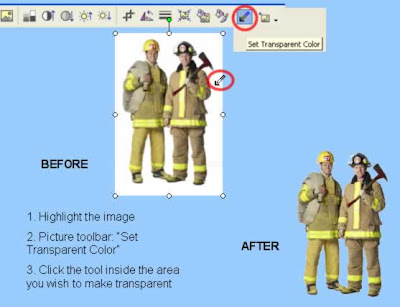
According to the Office Assistant: "You can create a transparent area in most pictures except in animated GIF. (Make these changes in an animated GIF editing program, and then insert the file again.)...The Set Transparent Color option is available for bitmap pictures that don't already have transparency information. It's also available for some, but not all, clip art." (Most of the art I use comes from clipart.com, and have had good luck with transparencies.)

According to the Office Assistant: "You can create a transparent area in most pictures except in animated GIF. (Make these changes in an animated GIF editing program, and then insert the file again.)...The Set Transparent Color option is available for bitmap pictures that don't already have transparency information. It's also available for some, but not all, clip art." (Most of the art I use comes from clipart.com, and have had good luck with transparencies.)
Sunday, March 16, 2008
Are you a technical communicator-type?
Are you a technical communicator? Lots of "application training"? User manuals? "Help" data?
I'm running the Instructional Design Institute for the Society for Technical Communications' annual Technical Communications Summit June 1-4 in Philadelphia. This is a big, fun event great for those who deal in technical communication and information (hint to those of you who do "app training"...)
Karl Kapp and Susan Boyd will be joining me for the ID Institute; we hope to see you there!
I'm running the Instructional Design Institute for the Society for Technical Communications' annual Technical Communications Summit June 1-4 in Philadelphia. This is a big, fun event great for those who deal in technical communication and information (hint to those of you who do "app training"...)
Karl Kapp and Susan Boyd will be joining me for the ID Institute; we hope to see you there!
Sunday, March 09, 2008
Using Game-Show Games to Replace Quizzes

Cathy Moore has been having a discussion about "shoestring" approaches, and among her suggestions are using, 1. photos of real people, and, 2. multiple choice questions recast as games. I give both of these ideas a lot of coverage in my books, but here's a quick example in practice.
Based on the "Hollywood Squares" game, this was developed for a new-hire orientation program both as a way to cover fairly dry content as well as helping staff recognize people they'd need to know to both "get around" and "get along" in the office. (I remember the morning one of our bright-eyed-bushy-tailed new employees encountered our agency head-- then Governor-Elect -- and greeted him with a hearty "Whassup!?")
The real program is proprietary but I dummied up a reasonable facsimile in PowerPoint this morning-- enough for you to get the idea. See E-Learning Solutions on a Shoestring and especially Better than Bullet Points for more ideas on using game-show game approaches to replace traditional methods of quizzing.
Wednesday, March 05, 2008
What does "LMS" mean to you?
Will Thalhimer has a recent post in which he discusses "LMS" as the "Learning Means Sitting" mentality, while Mark Oehlert once called it a "Lecture Management System".
What does "LMS" mean to you?
What does "LMS" mean to you?
Subscribe to:
Posts (Atom)


 Posts
Posts

